

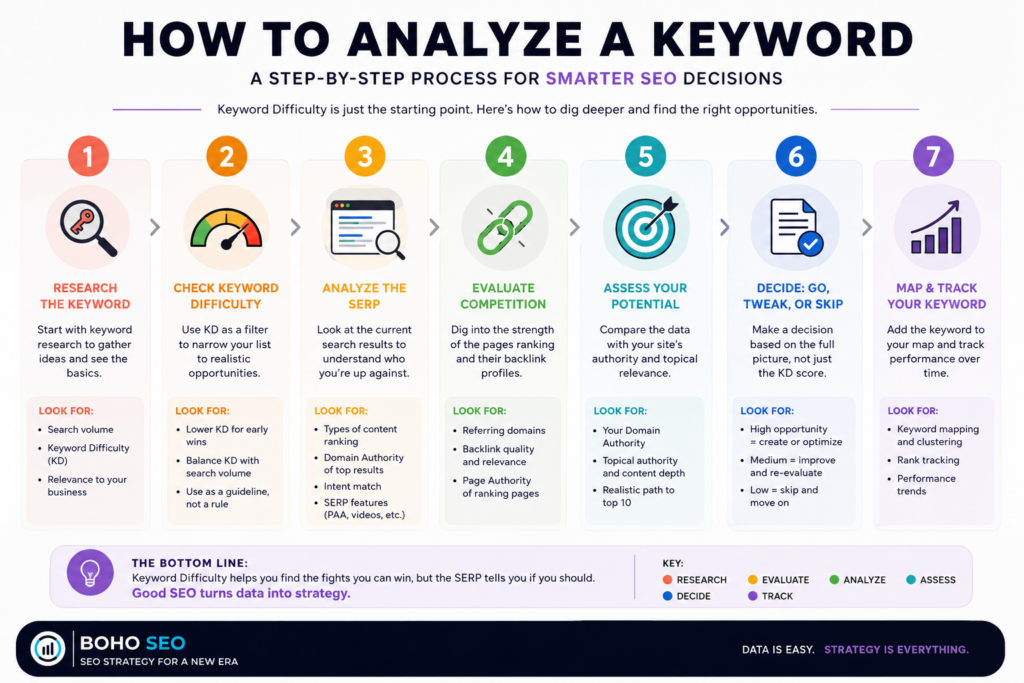
Keyword Difficulty (KD) is a useful starting point for evaluating keyword competition, but it shouldn’t be the deciding factor. Use it to filter opportunities, then assess search intent, the SERP, competing sites, your site’s authority, and the keyword’s potential value before deciding whether to target it.
As an SEO expert and Semrush Ambassador, I’ve seen countless beginners get paralyzed by the sheer volume of data in their dashboards. If there is one metric that acts as a “North Star” for your early content efforts, it’s Keyword Difficulty (KD).
But before you start chasing every “easy” green light keywords you see, you need to understand what this number actually represents—and why we SEOs “made it up” in the first place.
What Is Keyword Difficulty?
At its simplest, keyword difficulty is a metric that estimates how much effort and authority it will take to rank on the first page of a Google search for a specific keyword.
Most platforms, including the Semrush keyword magic tool, provide this as a percentage from 0 to 100.
This keyword difficulty score is broken down into tiers:
- 0–14 (Very Easy): You can likely rank with quality content alone.
- 15–29 (Easy): You’ll need good content and perhaps a bit of topical authority.
- 30–49 (Possible): You’ll need well-optimized content and some quality backlinks.
- 50–100 (High Difficulty): You are competing with the “Goliaths” of the internet.
Watch The Video To Learn More
The Truth: It’s a “Made Up” Metric (With a Real Foundation)
Here is a secret from the experts: Ranking difficulty does not technically exist inside Google. If you asked a Google engineer what the “KD” of a keyword phrase is, they wouldn’t have a proprietary number for you.
However, these scores aren’t pulled out of thin air. They are reverse-engineered from Google’s PageRank patent.
The original PageRank patent describes a method for ranking pages based on the “importance” of the documents linking to them. Modern keyword research tools take the core logic of this patent—analyzing the backlink profile, domain strength, and content quality of the current top 10 results—to calculate a difficulty score. It’s a shorthand way for us to measure the “rank-ability” for a specific term.
Semrush vs. Moz: Which Keyword Metrics Matter?
In the world of SEO tools, two titans lead the way. As a Semrush Ambassador, I rely on the Keyword Magic Tool for deep dives, but many beginners also start with Moz Pro. Here is how their metrics compare:
Semrush (KD% / Authority Score)
Semrush uses an Authority Score to measure the power of a domain. When you look at a keyword overview in Semrush, the KD score is heavily weighted by the number of referring domains and the quality of those links. It is highly reactive to real-time shifts in the search result pages.
Moz (Difficulty / Domain Authority)
Moz pioneered Domain Authority (DA) and Page Authority (PA). Their Keyword Explorer tool calculates difficulty by looking at the DA and PA of the sites currently ranking. While Moz is excellent for a quick “at-a-glance” check, it often updates less frequently than Semrush’s live data.
| Feature | Semrush (Keyword Magic Tool) | Moz (Keyword Explorer) |
|---|---|---|
| Primary Metric | Authority Score | Domain Authority |
| Focus | Real-time keyword competition | Historical stability |
| Logic | Link velocity & backlink profile | Page & page authority |
Why “Rank-ability” Matters for Your Strategy
In keyword research, we use these tools to identify the right keywords—those that are relevant but within your “rankability” range. This is often called personal keyword difficulty; a keyword might be “hard” for a new blog but “easy” for an established site.
When you are planning your keyword mapping, your keyword tool should help you balance search volume with search intent. If you are a newer site, your content strategy should focus on the long tail keyword.
How to Find Rank-able Keyword Ideas:
- Start with the Keyword Magic Tool: Enter a broad term to get a list of keyword suggestions.
- Filter by KD: Set your keyword difficulty checker filter to “Easy” to find the low-hanging fruit.
- Check the SERP: Ensure the target keyword aligns with what the user is actually looking for.
- Analyze the Competition: Use the keyword overview to see if the sites currently ranking are beatable.
- Check for Keyword Cannibalization: Make sure you aren’t already ranking for the term. Use my keyword cannibalization checker to find new keywords.
While Google Keyword Planner is great for paid ads, it doesn’t provide the nuanced keyword metrics needed for organic growth. That’s why using a dedicated keyword research tool is non-negotiable for a modern SEO content strategy.
 Ready to Find Your Winning Keywords?
Understanding the keyword difficulty tool is the difference between guessing and growing. It’s about picking the fights you can actually win so you don’t waste time on a high difficulty term that won’t budge.
Keyword Difficulty FAQs
- Is Keyword Difficulty accurate?
Keyword Difficulty is an estimate, not a guarantee. Different SEO tools calculate it differently, so the score should be treated as one data point rather than a definitive measure of whether you can rank. - What is a good Keyword Difficulty score?
There isn’t one universal “good” KD score. What’s realistic depends on your site’s authority, topical relevance, the search intent, and the websites currently ranking. A high-KD keyword can still be worth pursuing if it has strong business value and your site can compete in the SERP. - Should I always choose keywords with low Keyword Difficulty?
No. Low KD can help you find easier opportunities, but a low-difficulty keyword isn’t automatically valuable. Always consider relevance, search intent, traffic potential, and business value before choosing a target keyword. - When should I ignore Keyword Difficulty?
Consider looking beyond KD when the keyword is highly relevant to your business, has strong commercial value, or the SERP appears weaker than the difficulty score suggests. If your site already has strong authority around the topic, you may also be able to compete for keywords with higher difficulty. - What should I look at besides Keyword Difficulty?
Look at the search intent, SERP composition, competing domains, page and domain authority, referring domains, existing rankings, search volume, traffic potential, and business value. The SERP itself can tell you much more about your actual ability to compete than a single difficulty score.
