

When rankings decline during or after a Google algorithm update, the first instinct is often to start changing things.
Don’t.
Start by diagnosing what actually changed.
Your SEO tracking data can help you determine whether the decline is isolated to specific URLs, keywords, topics, or types of content. Your SEO activity log then gives you another layer of context: what work was recently performed on those pages?
Compare Historical Rankings and SERP Changes
When you identify a ranking drop, look beyond your current keyword positions. Use the Semrush Organic Research tool to export historical ranking data and compare changes over time.
Look at:
- Rank position: Where did the keyword rank before and after the decline?
- SERP feature position/type: Did the keyword gain or lose visibility in AI Overviews, featured snippets, PAA, shopping, or other SERP features?
- Ranking URL: Is the same URL still ranking, or has Google started showing a different page?
Comparing these data points can help you identify ranking fluctuations, sudden dips, and patterns across affected pages. It also gives you a clearer picture of whether you’re dealing with an isolated keyword movement, a URL-level change, or a broader shift in search results.
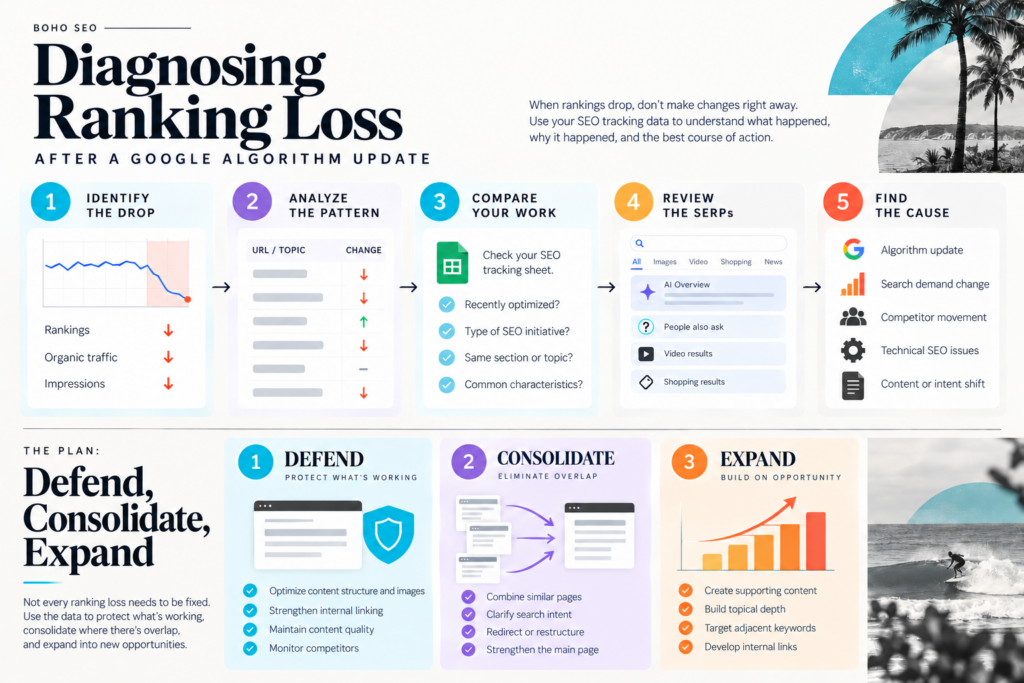
Use the following framework to work through a ranking loss before deciding what to change.
| What you’re seeing | What to investigate | Questions to ask | Potential response |
|---|---|---|---|
| A few URLs lost rankings | Compare affected URLs with your SEO activity log | Were these pages recently optimized? Did they receive similar SEO efforts? | Review the specific pages before making sitewide changes |
| A group of pages in the same topic declined | Look at the content cluster and search intent | Are competitors now better aligned with the search intent? Is Google favoring a different type of content? | Consolidate, update, or strengthen the topic cluster |
| Previously strong pages lost positions | Compare historical rankings and current SERPs | What changed in the search results? Are new competitors or SERP features appearing? | Defend pages that still have strong relevance and authority |
| Multiple pages target similar keywords | Look for keyword cannibalization and overlapping intent | Are several URLs competing for the same search intent? | Consolidate or clarify the role of each page |
| Rankings dropped but impressions remain strong | Examine CTR and the current search results | Has the SERP changed? Are AI Overviews, PAA, shopping, video, or other features taking more space? | Optimize for the current SERP rather than assuming the content is failing |
| Rankings and impressions both declined | Compare search demand and competitor visibility | Is this a site-specific decline or part of a broader change? | Determine whether the issue is content, competition, demand, or the algorithm |
| Pages lost rankings despite recent optimization | Compare the timing of the work with the update | Did the changes have enough time to take effect? Did other pages with similar characteristics also decline? | Don’t immediately undo the work. Continue monitoring and investigate the broader pattern |
| Pages with no recent SEO work also declined | Compare affected and unaffected URLs | What characteristics do the affected pages share? | Look for a broader sitewide, topical, technical, or search-environment issue |
| Some pages gained while others lost | Compare the characteristics of winners and losers | What does Google appear to be rewarding now? | Study the difference between the two groups before changing the strategy |
From Diagnosis to Action: Defend, Consolidate, Expand
- The goal of this analysis isn’t to “fix” every page that lost a ranking.
- Sometimes the right response is to defend what is already working.
- Sometimes it is to consolidate overlapping or underperforming content.
And sometimes the data reveals an opportunity to expand into areas where the site has demonstrated relevance but doesn’t yet have enough depth.
This creates a simple framework for responding to algorithm-related ranking changes:
| Action | When to use it | What it means |
|---|---|---|
| DEFEND | A page has strong rankings, traffic, conversions, or strategic value | Protect the pages and topics that are already performing. Strengthen internal linking, maintain content quality, monitor competitors, and avoid unnecessary changes. |
| CONSOLIDATE | Multiple pages overlap, compete for the same intent, or aren’t individually strong enough | Combine, redirect, or restructure content so that your strongest page has a clearer purpose and stronger signals. |
| EXPAND | The data shows an area where the site has relevance but insufficient depth | Build supporting content, strengthen topic coverage, develop internal links, and create additional resources around the opportunity. |
This was the approach we used when analyzing ranking changes for an e-commerce site following significant SERP volatility.
Rather than treating every ranking loss as a problem that needed to be fixed, we looked at the patterns across the site.
- Some pages needed to be protected.
- Some areas needed to be consolidated.
- And other areas represented opportunities to build greater topical depth.
That’s a much more useful response to an algorithm update than simply changing titles, adding keywords, or rewriting pages because their rankings moved.
The objective isn’t to react to every ranking change. It’s to understand the pattern well enough to know where to defend, where to consolidate, and where to expand.
And this is exactly why maintaining an SEO activity log matters. When you know what pages you worked on, when you worked on them, and what you changed, you have another layer of evidence to use when diagnosing SEO performance.
Frequently Asked Questions
What should I do if my Google rankings suddenly drop?
Start by diagnosing the pattern before making changes. Use Google Search Console and your SEO tracking data to determine which pages, keywords, and topics were affected. Then compare the timing of the ranking drop with recent SEO work, changes in search results, and any Google algorithm updates.
How can I tell if a ranking drop was caused by a Google algorithm update?
Look for patterns across your site rather than focusing on a single keyword ranking. If multiple pages or topics experienced a decline around the same time as a Google core update or other algorithm update, compare affected and unaffected pages. Review content quality, search intent, technical SEO issues, competitor visibility, and changes in the search results before determining what may have contributed to the ranking loss.
Why did my rankings drop but my traffic stay the same?
A ranking drop doesn’t always result in a traffic drop. Your pages may still receive significant visibility from other keywords, search results, or SERP features. Check Google Search Console alongside Google Analytics to understand how impressions, clicks, traffic, and conversions changed. Also consider whether changes such as AI search or other SERP features are affecting how users interact with the results.
Should I change my content after a Google ranking drop?
Not necessarily. First, determine why the ranking changed. Look at the affected pages, search intent, content quality, internal links, technical SEO, and changes in the search results. If pages with no recent SEO work also lost rankings, the issue may be broader than the content itself. Avoid making changes simply because a keyword ranking moved.
How do I recover lost Google rankings?
There isn’t a single fix for lost rankings. Once you’ve diagnosed the ranking loss, decide whether the appropriate response is to defend, consolidate, or expand. You may need to strengthen a strong page, consolidate overlapping content, improve internal linking, address technical SEO issues, or expand topical coverage. The right response depends on the pattern behind the ranking drop, not simply the fact that rankings declined.
